

Whether you’re setting up a home office, managing a small business, or looking for a reliable family printer, Best All In One Printers have become essential in 2026. According to Consumer Reports and CNET, the best all-in-one printers combine affordability with versatility, offering print, scan, copy, and fax capabilities in one compact machine. We’ve researched and compared 10 top-rated models ranging from $159.99 – $599.99 to help American families and entrepreneurs find exactly what they need.
Our guide focuses on real-world performance, ease of use, and long-term value. Whether you prioritize speed, color quality, wireless connectivity, or low ink costs, you’ll find a printer that matches your priorities. We’ve also included a comprehensive buying guide to help you understand key features like print speed, connectivity options, and maintenance costs. Check out our related guide on best photo scanners if you’re also interested in high-quality document capture.
Top-Rated Best All In One Printers We Recommend
We’ve narrowed down the field to the 10 best performers across multiple categories. From the feature-rich HP OfficeJet Pro 9730 with wide-format printing to budget-friendly options like the HP Smart Tank 5000, each model excels in specific areas. Brands like Brother, Canon, Epson, and HP consistently deliver reliable performance that meets the expectations of American households and small offices.

The HP LaserJet Pro MFP 3101sdw is a wireless all-in-one laser printer built for small teams and home offices that need reliable black and white document handling. It is ideal for users printing reports and forms on a regular basis.
Standout features include print speeds up to 35 pages per minute, automatic duplex printing, and a 50-sheet auto document feeder that support real-world office workflows without delays. The design features a 250-sheet input tray and solid build quality for daily handling.
HP is a well-known brand trusted by American consumers for consistent performance in home and business settings. Some users may note the cartridge restrictions and lack of color printing as limitations. Overall this printer offers strong value through efficiency and dependability for its target users.
- Delivers professional black and white documents with speed and consistency
- Wireless features support flexible printing in modern setups
- Trusted HP brand provides durability for long-term use
- Duplex printing and large trays promote efficiency and savings
- Restricted to HP cartridges only due to chip requirements
- Prints in black and white exclusively with no color option

The HP Smart Tank 5000 is a wireless all-in-one printer suited for home users who need reliable everyday printing scanning and copying. It targets American families homeowners and parents handling schoolwork household documents and occasional color output.
Standout features include a refillable ink tank system with up to 2 years of ink supplied and AI-enabled formatting that trims wasted space from web pages and emails. Real-world performance focuses on cost savings and wireless convenience through the HP Smart app along with compatibility for Apple AirPrint and Android devices.
Design and build quality emphasize simple setup and mess-free refills making it easy to maintain over time. As a product from HP a reputable well-known brand trusted by American consumers it benefits from strong innovation and support resources.
Some limitations include moderate speeds and basic features without advanced duplexing. Overall the HP Smart Tank 5000 earns a positive verdict for value-driven home printing where convenience and ink longevity matter most.
- Provides extended ink supply for low ongoing costs in family households
- Enables wireless printing from multiple devices with easy app integration
- Uses AI to optimize prints and reduce paper usage effectively
- Comes from a trusted brand known for durable home electronics
- Supports reliable cartridge-free operation for consistent daily needs
- Print speeds are not the fastest for high-demand environments
- Missing advanced features like automatic two-sided printing
- Best limited to basic home tasks rather than heavy office workloads

This wide-format all-in-one printer from HP handles print, scan, copy, and fax tasks with support for documents up to 11x17 inches. It suits small offices and professionals who need reliable color output for plans, reports, and presentations.
Standout features include fast print speeds, automatic duplex capabilities, and a large touchscreen interface. Real-world performance shows consistent results with wireless connectivity that maintains stable connections. The build quality feels durable for daily use in American homes and offices.
HP is a well-known brand trusted by American consumers for dependable printing solutions. Design incorporates recycled materials and strong security protocols. Some users may find the overall footprint substantial for compact workspaces. Overall, it provides solid value for those requiring wide-format versatility and convenience in a single machine.
- Wide-format support enables printing of larger documents essential for many office tasks
- Included ink trial program offers convenience and initial savings on supplies
- Strong security features help protect sensitive office data during wireless use
- Automatic duplex functions reduce paper waste and improve efficiency
- Trusted brand reputation ensures long-term reliability for everyday demands
- Ongoing ink needs may lead to recurring costs after the trial period
- Device size requires adequate space in the workspace
- Subscription model for ink may not appeal to all buyers
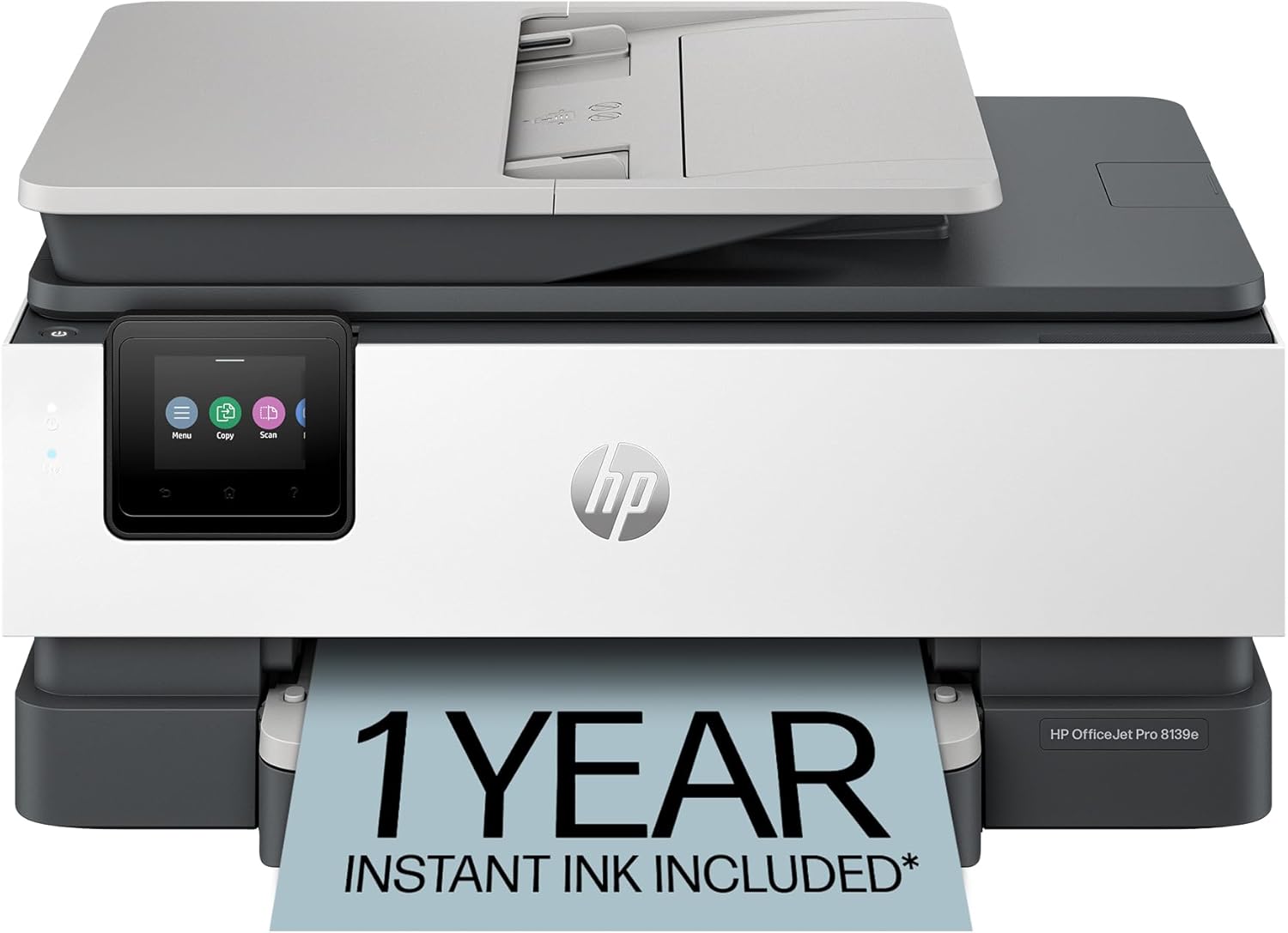
The HP OfficeJet Pro 8139e is a wireless all-in-one color inkjet printer designed for home offices and small workspaces common among American families and professionals. It handles print scan copy and fax tasks with wireless connectivity and auto duplex features that support efficient daily workflows.
Standout capabilities include fast print speeds up to 20 pages per minute in black along with AI-assisted formatting to minimize wasted pages during real-world use. The 225-sheet tray and automatic document feeder add convenience for multi-page documents without constant reloading.
Build quality emphasizes durability with a modern touchscreen interface and sustainable materials including over 45 percent recycled plastic. As a product from HP a well-known brand trusted by American consumers it integrates security features to help safeguard home networks during regular operation.
Some users may note the need for HP cartridges and account activation for full subscription benefits which could affect long-term flexibility. Overall this printer offers strong value for those seeking reliable all-in-one performance in home settings with a final verdict that it meets everyday needs effectively for most US households.
Reputable HP brand trusted by many American consumers for reliable home office equipment.
- All-in-one functions cover printing scanning copying and faxing in one compact unit.
- AI features help format prints accurately to reduce paper waste in daily use.
- Large paper capacity and auto features support consistent performance for families and small businesses.
Requires HP+ account activation to access the full one-year Instant Ink trial.
- Designed to work only with HP cartridges which limits flexibility for some users.
- Subscription fees apply after the initial trial period for ongoing ink delivery.

The HP OfficeJet Pro 8139 is a wireless all-in-one inkjet printer built for home offices and remote workers who need professional color documents on a regular basis. It handles printing scanning copying and faxing with features like an auto document feeder and duplex printing that streamline daily tasks.
Standout capabilities include fast output speeds and wireless connectivity that works reliably with home networks. The design features a clear touchscreen interface and sustainable materials that appeal to American families focused on value and practicality. This model comes from HP a well-known brand trusted by American consumers for durable office equipment.
Real-world performance emphasizes ease of use through the mobile app and AI tools that reduce formatting issues. Build quality supports consistent results in typical household settings. Some users may note the need for specific cartridges and potential ongoing service costs after the trial period. Overall this printer delivers solid convenience for those managing home-based paperwork.
- Trusted brand reputation ensures dependable performance for American home offices.
- Versatile all-in-one functions cover printing scanning copying and faxing in one device.
- Wireless setup and app control add convenience for busy households.
- Paper-saving duplex printing and ink trial promote cost efficiency over time.
- Security features provide peace of mind for network-connected users.
- Compatible only with original HP cartridges which restricts flexibility.
- Subscription fees apply after the first year of ink service.
- Paper tray size may not suit very high daily print volumes.

The Brother DCP-L2640DW serves as a reliable monochrome laser printer for small business owners and home office users across the United States. It combines printing, copying, and scanning in a single compact unit from a well-known brand trusted by American consumers for consistent quality.
Standout features include print speeds up to 36 pages per minute, dual-band wireless connectivity, and an auto document feeder that streamlines multi-page tasks. Real-world performance supports high-volume needs with automatic duplex printing that conserves resources. The design emphasizes durability and a small footprint suitable for everyday American workspaces.
Build quality reflects solid engineering with secure connection options and energy compliance. While it lacks color output, the focus on black and white efficiency meets core demands effectively. The final verdict positions this as a practical choice for users prioritizing reliability and convenience over advanced color capabilities.
- Reputable brand delivers dependable performance for daily business and home tasks
- Wireless and Ethernet options provide flexible, secure connections for multiple devices
- Duplex printing and energy ratings promote efficient, cost-effective operation
- Mobile app support allows convenient remote management from anywhere
- Compact size maximizes desk space without sacrificing function
- Black and white printing limits use for color document needs
- Subscription service for toner requires active management to achieve savings
- Initial network configuration may demand extra setup time for some users

The Canon MF665Cdw is a color laser all-in-one printer designed for small home offices and hybrid work setups common among American users. It handles printing scanning copying and faxing with wireless connectivity and automatic duplex features for efficient document management.
Standout capabilities include fast print speeds up to 26 pages per minute quick first print times and a 50-sheet automatic document feeder that processes double-sided pages in one pass. The customizable 5-inch touchscreen simplifies navigation while mobile app support enables printing from compatible devices without extra hardware.
Build quality reflects Canon's reputation as a well-known brand trusted by American consumers for reliable everyday performance. The 250-sheet paper capacity and high-yield toner options support consistent use in home environments with minimal maintenance.
Some users may note the initial cost and need for periodic toner changes compared to lower-volume options. Overall this model delivers strong value through convenience and durability for families or professionals seeking a capable wireless printer solution.
- Reputable Canon brand trusted by American consumers for durable office equipment
- All-in-one functions with wireless duplex capabilities meet needs of hybrid work environments
- Energy efficient design helps reduce operating costs for homeowners and small businesses
- Intuitive touchscreen and mobile printing enhance convenience in everyday American households
- Color laser models typically cost more upfront than basic inkjet alternatives
- Toner cartridges require periodic replacement based on print volume
- Larger footprint may not suit very compact workspaces
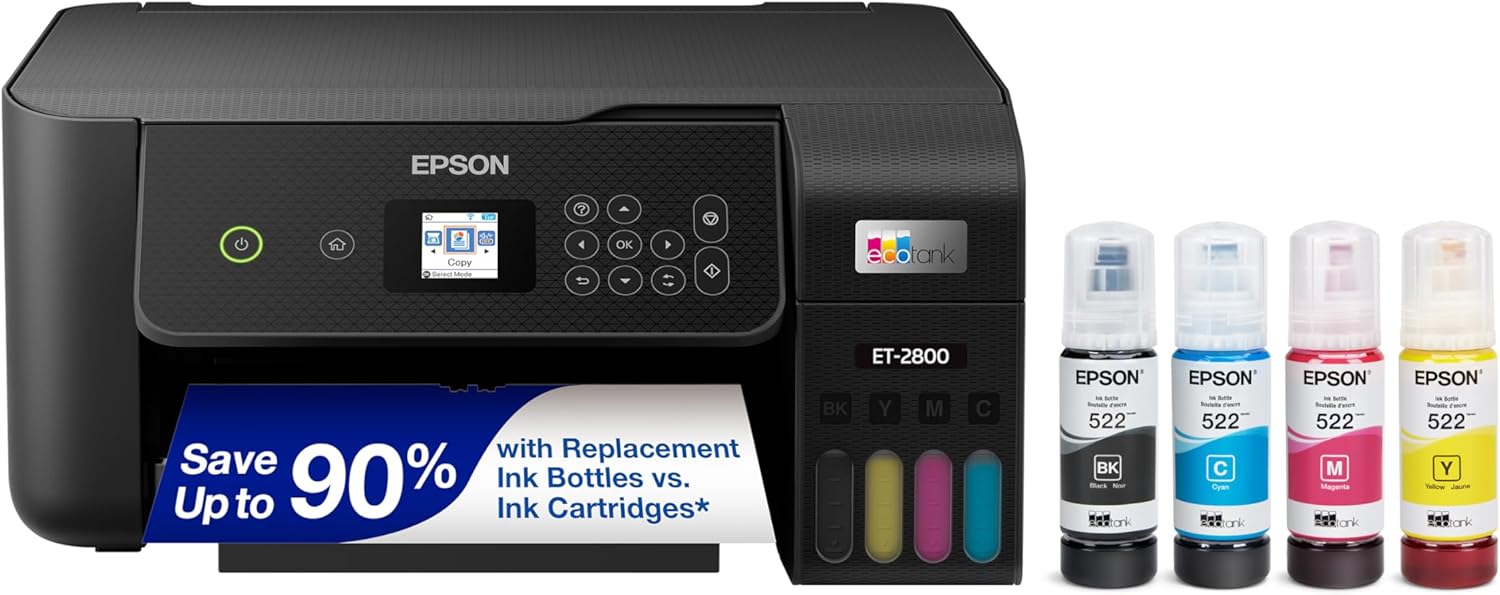
The Epson EcoTank ET-2800 is a wireless all-in-one printer that handles printing, scanning, and copying for home users including families and remote workers. It uses refillable ink tanks that hold enough ink for up to thousands of pages, reducing the need for frequent changes.
Standout features include wireless connectivity for phone and computer printing along with voice activation options. Real-world performance shows reliable output with sharp text and clear colors suitable for documents and photos. The design is compact with a simple interface that fits well in home settings.
This product comes from Epson, a reputable and well-known brand trusted by American consumers for durable electronics. Build quality supports everyday use without issues in typical household conditions. Some drawbacks include the absence of auto duplex printing and an automatic document feeder, which may affect high-volume tasks. Overall the Epson EcoTank ET-2800 provides solid value for reliable home printing needs.
- High-capacity ink tanks deliver thousands of pages per refill for lower long-term costs
- Wireless features allow flexible printing from phones, tablets, and computers
- Epson brand reputation offers peace of mind with reliable support
- Heat-free printing technology ensures consistent quality and efficiency
- Includes ample ink supply right away for immediate extended use
- No automatic two-sided printing option for double-sided documents
- Lacks an automatic document feeder for batch scanning
- Basic controls may require extra steps for some advanced functions


The Canon MegaTank GX2020 is an all-in-one wireless printer designed for home offices and small workspaces. It handles printing, copying, and scanning with a refillable ink system that supports high page volumes.
This model comes from Canon, a reputable brand trusted by American consumers for reliable office equipment. Standout features include wireless dual-band connectivity, a 2.7-inch color touchscreen, automatic duplex printing, and a 35-sheet auto document feeder. Real-world performance delivers sharp text and vibrant color output suitable for documents and photos up to legal size.
Build quality feels solid with a compact footprint that fits typical American home desks. The design prioritizes ease of use with simple ink loading and media handling for envelopes, banners, and more.
While the printer offers strong value for most users, print speeds are not the fastest available. Overall, the GX2020 provides dependable performance backed by Canon's service network, making it a smart choice for families and professionals who need consistent results without high ongoing costs.
- High page yields from refillable tanks reduce long-term printing expenses
- Wireless and mobile printing options support flexible home and office setups
- Compact design and user-friendly controls simplify daily operation
- Auto duplex and document feeder features boost productivity
- Canon reputation ensures reliable support and durable construction
- Moderate print speeds limit suitability for large-scale business use
- Initial ink setup takes extra attention and time
- Print size capped at standard letter and legal formats
Our Final Recommendations
For most households and small offices, Brother DCP-L2640DW offers the best balance of speed, reliability, and affordability. With print speeds up to 36 ppm and a compact footprint, this monochrome laser printer delivers professional-quality documents while keeping operating costs low. According to Good Housekeeping, laser printers like this model are ideal for high-volume printing and offer superior text quality compared to inkjet alternatives.
If color printing is essential for your needs, HP OfficeJet Pro 8139 combines vibrant color output with wireless convenience and AI-powered formatting. Both models come highly rated by users and feature intuitive touchscreens, wireless connectivity, and mobile printing capabilities. Whether you choose monochrome or color, these printers deliver years of reliable service for American families and home-based businesses.
Frequently Asked Questions About Best All In One Printers
What’s the difference between inkjet and laser Best All In One Printers?
Inkjet printers excel at color printing and photo quality, making them ideal for creative projects and home use. Laser printers deliver faster speeds and lower per-page costs, making them better for high-volume document printing. According to Wirecutter, your choice depends on whether you prioritize color quality or printing volume and cost efficiency.
How much should I spend on an all-in-one printer?
Quality Best All In One Printers range from under $200 to over $500. Budget models work fine for occasional home use, while mid-range options ($250-$400) offer better build quality and features for small offices. Premium models provide advanced security, faster speeds, and superior color accuracy. Consider your printing volume and specific features when determining your budget.
Are refillable ink tanks worth the investment?
Yes, if you print frequently. Refillable tank systems like those in Epson EcoTank and HP Smart Tank models cost more upfront but deliver significantly lower per-page costs over time. Consumer Reports notes that tank-based systems can reduce ink expenses by up to 80% compared to traditional cartridges, especially for households printing hundreds of pages monthly.
Which printer features matter most for home offices?
Wireless connectivity, automatic document feeders, and duplex (two-sided) printing are essential for productivity. Mobile printing apps and touchscreen controls add convenience. Security features like encrypted scanning and secure printing protect sensitive documents. Visit our Tech category for more office equipment recommendations that complement your printer setup.
How do I choose between color and monochrome printing?
Choose monochrome if you primarily print business documents, reports, and text-heavy materials. Color printers suit creative professionals, marketing teams, and households that print photos or presentations regularly. Monochrome models typically offer faster speeds and lower operating costs, while color printers provide versatility for diverse printing needs.
What warranty and support should I expect?
Most quality Best All In One Printers include one to three years of limited warranty coverage. HP, Brother, and Canon offer reliable customer support through phone, email, and online resources. Many manufacturers provide extended warranty options and subscription-based support plans. Check the specific model’s warranty details before purchasing to ensure adequate coverage for your needs.
Can I use third-party ink or toner cartridges?
Some printers accept third-party cartridges, while others use chip-protected systems that block non-manufacturer supplies. Using non-genuine cartridges may void your warranty and affect print quality. For long-term savings, consider printers with refillable tank systems or those that work reliably with compatible supplies, as recommended by tech reviewers and user communities.







Write Your Review
No reviews yet. Be the first to share your experience!